Develop Update Release Notes
February 20, 2026 - 0.6.5-14 Develop + NEW 0.6.6 Stable Version Release Notes
MDI Queue / Feedhold Recovery and Cycle Start Resume Fixes
This session includes stability and workflow fixes for MDI queue execution, feedhold resume behavior, and release-note process updates across Probe Basic and QtPyVCP integration paths.
MDI history queue handling was hardened to prevent invalid selection/index edge-case failures.
Queue pause/resume interaction was improved with clearer state transitions.
Feedhold during queued MDI execution can now resume reliably from cycle start in the supported machine-state path.
Duplicate normal cycle-start dispatch in Probe Basic mill/lathe handlers was removed so cycle-start behavior is no longer double-invoked.
Internal running notes and split stable/develop release-note workflow were introduced to keep release documentation accurate by channel.
Important DRO Update Notice
User DRO bug fixes were applied to the supplied user_dro_display files (axis mapping and zero/offset behavior corrections). Users should replace older DRO UI files in their machine config with the updated files from the latest sim config package to ensure proper functionality.
Overview of updates for MILL configurations
Probe Basic and Probe Basic Lathe have just received major updates that will require users to make some changes to their configurations in order for Probe Basic to properly function. These changes offer a variety of benefits at the cost of some initial configuration editing. Below is a list of changes being rolled out in this update:
February 5, 2026 - Probe Basic Stable Release Version 0.6.2
Probe Basic has had a new stable release to version 0.6.2 in order to update to the latest stable release we have put it on a new repo and the sources list must be updated. in order to install either the latest 0.6.2 stable or 0.6.2+ develop versions of Probe Basic, please use the ‘Changing <-> Develop Versions’ section of the documents. you will need to uninstall your current versions of qtpyvcp and probe basic using the doc below and set the new sources list repo location in the sources.list.d/kcjengr.list file. The doc below will walk you through how to go about this! Please also see the other important updates below that will require some configuration changes to your existing machine configs in order for Probe Basic to function properly.
Changing Stable <-> Develop Versions:
Subroutines have been updated to improve functionality and fix bugs. It is advised to compare the latest subroutine files with your machine config subroutines for any changes, or copy over the latest subroutine folder if you have not made any edits or customizations to your existing subroutines. The main update comes from using the native LinuxCNC on_abort_command rather than msg or debug in the subroutines. This will allow the user to edit their on_abort.ngc file to best suit their needs. The bug that this fixes is that the on_abort.ngc now packaged in the subroutines folder has an M2 at the end which will terminate the program and correct issues with Probe Basic being left in an incorrect state. Users will need to add the following line to their INI file under the [RS274NGC] section:
ON_ABORT_COMMAND = o<on_abort> call
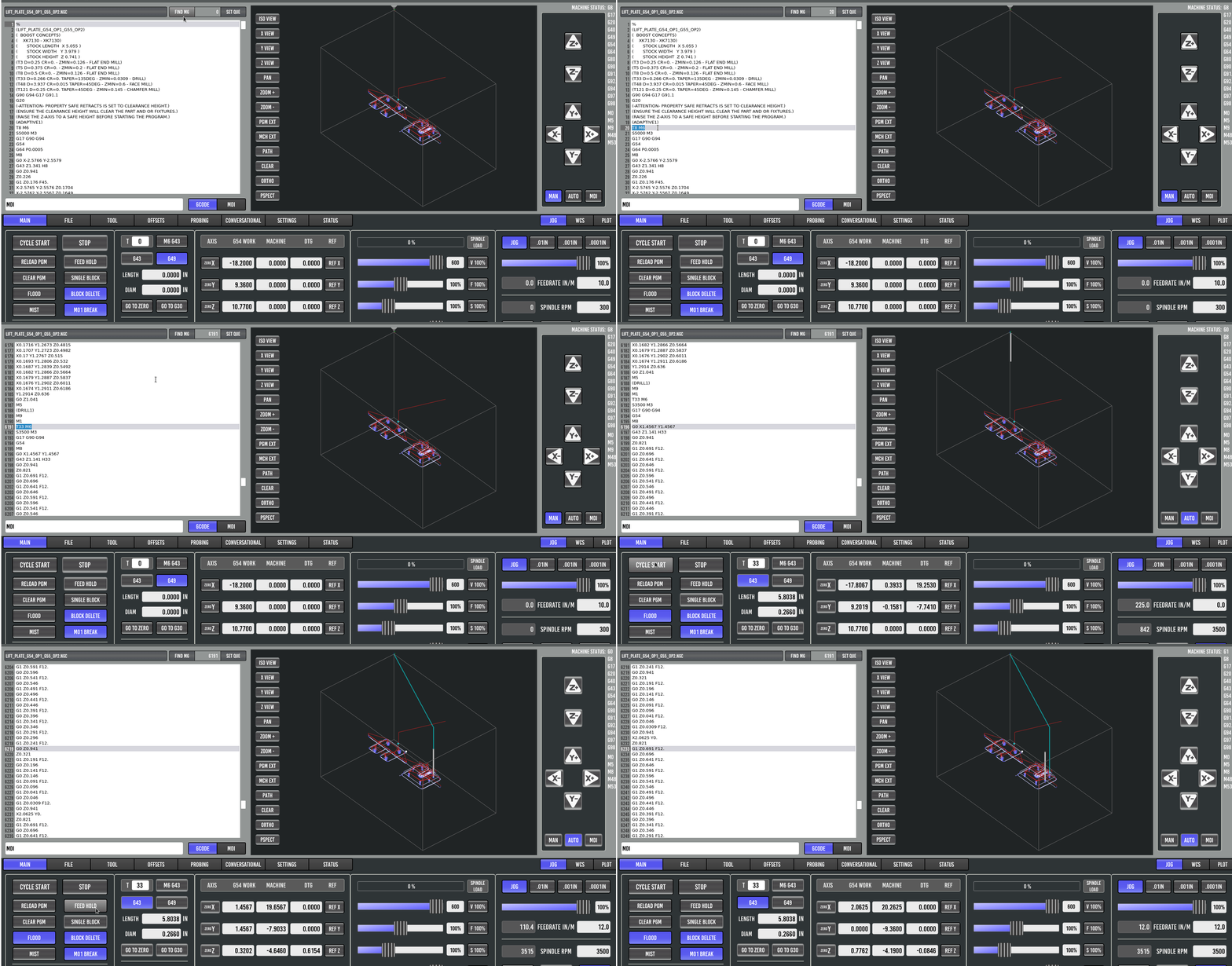
Run from M6 gcode line in a program. You can now easily button press through your program, finding each M6 gcode command line, and select the one from which you would like to run the program by checking the “SET QUE” button to blue (active) and then pressing the cycle start button. This will set the program to run from that M6 tool change line onward. This is useful for long programs where you may want to restart from a specific tool change without having to edit the gcode program file. The button will automatically “uncheck” itself after use to prevent accidental restarts from M6 lines.
Previous Updates Notes
User Buttons (cyclestart, stop, feedhold etc) are now user configurable from template in config folder. A user template has been included also for custom buttons for users to easily edit and make changes to suit their machine builds. Users will need to copy the user_buttons folder from the sim config to their machine config and edit the ini file to set the appropriate path by adding the following lines to the [DISPLAY] section of the ini:
USER_BUTTONS_PATH = user_buttons/
DRO Displays are now user configurable from the ini file with options for mill configs being xyz, xyza, xyzab, xyzac, xyzbc, xyzabc. A user template has been included with xyzabc DROs for users to easily edit and make changes to suit their machine builds. Using only the DROs required has significantly sped up probe basic where it is not having to track and query multiple hidden DROs as it previously was doing. The jog button display will also update based on the DRO display settings. Users will need to copy the user_dro_display folder from the sim config to their machine config and edit the ini file to set the appropriate DROs and jog buttons to display by adding the following lines to the [DISPLAY] section of the ini:
USER_DROS_PATH = user_dro_display/

DRO_DISPLAY = XYZ (or desired configuration)
JOG axis buttons received a preconfigured addition of xyzbc.
Offset table column display now set in the ini file with the following line in [DISPLAY] section:
OFFSET_COLUMNS = XYZ (or desired configuration)
Tool table columns display now set in the ini file with the following line in [DISPLAY] section:
TOOL_TABLE_COLUMNS = XYZABCDQR (or desired configuration)
Keyboard jog settings are now user configurable with the following ini file [DISPLAY] entries:
KEYBOARD_JOG = true
- true sets KB jog active
- false turns KB jog off
KEYBOARD_JOG_SAFETY_OFF = true
- true turns requirement of safety keys off for KB jogging
- false sets KB jog safety keys active
ATC updates: you can now set the desired ATC Tab Display Setting to hide the ATC tab, display carousel ATC, or display rack ATC from the ini [DISPLAY] section in the following line:
ATC_TAB_DISPLAY = 0
- 0 sets the ATC tab hidden
- 1 sets the ATC tab to display the carousel type ATC
- 2 sets the ATC tab to display the new rack type ATC
ATC page received a user button widget. Users can now easily customize their required ATC buttons in this widget separate from the main UI so it will not be overwritten during future updates. The user_atc_buttons folder is located in the updated sim config folder and will need to be copied to the user’s machine config folder for use. User will need to add the following line to the [DISPLAY] section of the ini file to activate it:
USER_ATC_BUTTONS_PATH = user_atc_buttons/
User Tabs adds a main tab and a sidebar tab where the user can fully configure their own required widgets, buttons, line entries, etc., and have the UI file stored safely in their config folder so it will not be overwritten during updates. Add this feature by copying the user_tabs from the sim config folder to the user’s machine config folder and add the following lines to the [DISPLAY] section of the ini file:
USER_TABS_PATH = user_tabs/
Custom config YAML file will require edits or the newly edited version in the sim config will need to be copied over for some of the above features to work. Be sure to do this or you will receive some errors.
Probing Routine errors were fixed pertaining to using “hints”. The following files will need to be copied from the sim config subroutines folder to the user’s machine config subroutines folder. Below are the corrected file names for reference:
- probe_valley_x.ngc
- probe_valley_x_center_start.ngc
- probe_valley_y.ngc
- probe_valley_y_center_start.ngc
Subroutine updates: Many other subroutines received important edits. It is advised to compare the latest subroutine files with your machine config subroutines for any changes, or copy over the latest subroutine folder if you have not made any edits or customizations to your existing subroutines.
User Convenience settings were also added by request. These include a settings drop-down box to persistently set the active start-up tab that is displayed.
The File Tab now has buttons to hide or show the USB file manager on the left side, the setting is remembered and persistent through restarts.
Overview of updates for LATHE configurations
February 20, 2026 - Probe Basic Lathe Master Tool Promotion Feature
Probe Basic Lathe now supports Master Tool Promotion, a powerful feature for machines using Master Tool Offset Mode. This allows you to promote any secondary tool to become the new master tool (offsets X0, Z0) while automatically preserving all tool-to-tool spatial relationships.
Why use Master Tool Promotion?
When using Master Tool Offset Mode on a lathe, one tool is designated as the “master” with X0/Z0 offsets, and all other tools are measured relative to it. If your master tool needs repair, replacement, or becomes damaged, you would normally need to re-measure all tools in your tool table. With Master Tool Promotion, you can instantly promote any secondary tool to become the new master, and all other tool offsets are automatically recalculated to maintain their physical positions.
How to use:
Ensure Master Tool Offset Mode is enabled in your INI file (see machine_config.rst)
In the Tool Offsets tab, locate the “Master Tool Number” field
Enter the tool number you wish to promote (e.g., change from T1 to T5)
Press Enter - a confirmation dialog will appear showing the promotion details
Click “Yes” to proceed - all tool offsets are instantly recalculated
The promoted tool now has X0/Z0 offsets, all others adjusted accordingly
Example workflow:
Your master tool (T1) breaks and needs replacement
Remove the broken T1 from the turret
Promote a secondary tool (e.g., T5) to master: all offsets recalculated instantly
Install and measure your new/repaired tool in the T1 position
When ready, promote T1 back to master: all offsets are recalculated based on T1’s newly measured position
This feature maintains perfect precision - if you promote between tools without remeasuring (T1→T5→T1), you get exact original offsets with no accumulated error. When remeasuring tools between promotions, all offsets are accurately recalculated to preserve the spatial relationships with the newly measured tool. The tool table is automatically saved with explicit zero values to ensure LinuxCNC compatibility.
Configuration required:
Add the following to the [DISPLAY] section of your probe_basic_lathe.ini file:
MASTER_TOOL_OFFSET_MODE = true
For detailed information about Master Tool Offset Mode, see the machine_config.rst documentation.
Probe Basic Lathe received major updates that will require users to make some changes to their configurations in order for Probe Basic Lathe to properly function. The lathe user interface had been lagging pretty far behind and is now brought up to the same level as the mill UI in terms of features and functionality. These changes offer a variety of benefits at the cost of some initial configuration editing. The layout for lathe has changed slightly to accommodate the configurable functionality. Below is a list of changes being rolled out in this update:
Updates to Subroutines have been updated to improve functionality and fix bugs. It is advised to compare the latest subroutine files with your machine config subroutines for any changes, or copy over the latest subroutine folder if you have not made any edits or customizations to your existing subroutines. the main update comes from using the native linuxcnc on_abort_command rather than msg or debug in the subroutines. This will allow the user to edit their on_abort.ngc file to best suit their needs, the bug that this fixes is that the on_abort.ngc now packaged in the subroutines folder has an M2 at the end which will terminate the program and correct issues with Probe Basic being left in an incorrect state. Users will need to add the following line to their INI file under the [RS274NGC] section:
ON_ABORT_COMMAND = o<on_abort> call
Tool Post location display (front or back) is now user configurable from the ini file, to display use one of the following lines under the [DISPLAY] section of the ini:
LATHE = 1 (for front tool post machines)

BACK_TOOL_LATHE = 1 (for back tool post machines)
User Buttons (cyclestart, stop, feedhold etc) are now user configurable from template in config folder. A user template has been included also for custom buttons for users to easily edit and make changes to suit their machine builds. Users will need to copy the user_buttons folder from the sim config to their machine config and edit the ini file to set the appropriate path by adding the following lines to the [DISPLAY] section of the ini:
USER_BUTTONS_PATH = user_buttons/
DRO Displays are now user configurable from the ini file with options for lathe configs being xz, xzc, xyzc. A user template has been included also for custom DRO displays with xyzc DROs for users to easily edit and make changes to suit their machine builds. This also gives users using fewer axes some additional space for customizations specific to their machine right in the main lower panel DRO section. Using only the DROs required has significantly sped up probe basic where it is not having to track and query multiple hidden DROs as it previously was doing. The jog button display will also update based on the DRO display settings. Users will need to copy the user_dro_display folder from the sim config to their machine config and edit the ini file to set the appropriate DROs and jog buttons to display by adding the following lines to the [DISPLAY] section of the ini:
USER_DROS_PATH = user_dro_display/

DRO_DISPLAY = XZ (or desired configuration)
JOG axis buttons received a preconfigured addition of xyzc.
Offset table column display now set in the ini file with the following line in [DISPLAY] section:
OFFSET_COLUMNS = XZ (or desired configuration)
Tool table columns display now set in the ini file with the following line in [DISPLAY] section:
TOOL_TABLE_COLUMNS = TXYZIJDQR (or desired configuration)
Keyboard jog setting for lathe now uses arrows for X and Z and is now user configurable with the following ini file [DISPLAY] entries:
KEYBOARD_JOG = true
- true sets KB jog active
- false turns KB jog off
KEYBOARD_JOG_SAFETY_OFF = true
- true turns requirement of safety keys off for KB jogging
- false sets KB jog safety keys active
User Tabs adds a main tab and a sidebar tab where the user can fully configure their own required widgets, buttons, line entries, etc., and have the UI file stored safely in their config folder so it will not be overwritten during updates. Add this feature by copying the user_tabs from the sim config folder to the user’s machine config folder and add the following lines to the [DISPLAY] section of the ini file:
USER_TABS_PATH = user_tabs/
Custom config YAML file will require edits or the newly edited version in the sim config will need to be copied over for some of the above features to work. Be sure to do this or you will receive some errors.
User Convenience settings were also added by request, these are a settings drop down box to set persistently the active start up tab that is displayed.
The File Tab now has buttons to hide or show the USB file manager on the left side, the setting is remembered and persistent through restarts.